Home‑improvement shoppers who try to cash in on Menards rebates often stumble at the printing stage, where blurry text, misaligned fields, or missing pages can turn a simple claim into a frustrating ordeal. This guide walks everyday users through a clear, step‑by‑step path that eliminates the guesswork and gets the rebate form from screen to scanner in just a few minutes.
Identify the common roadblocks before you start
Most complaints stem from three sources: outdated printer drivers, incorrect PDF settings, and rushed handling of the printed form. When a rebate form is printed on the wrong paper size or with low‑quality settings, the barcode or signature line becomes unreadable, forcing a resubmission. Recognizing these pitfalls up front lets you avoid the back‑and‑forth with Menards’ rebate department.
Gather the right tools and files
- Computer with internet access – a recent browser (Chrome, Edge, or Firefox) ensures the PDF renders correctly.
- Printer that supports 8.5 × 11 in (Letter) paper – laser or inkjet works, but the printer must be calibrated.
- Original rebate PDF from Menards.com – download the file directly from the “Rebate” section to avoid corrupted copies.
- High‑gloss or standard printer paper – glossy paper can make barcodes hard to scan; standard 20‑lb office paper is safest.
- Scissors or a paper cutter – if you need to trim excess edges for a perfect fit.
Prepare your computer and printer
Start by updating the printer driver through the manufacturer’s website; an outdated driver can misinterpret page scaling. Next, clear the printer queue and perform a quick test page to confirm ink or toner levels. On the computer, open the PDF in a dedicated viewer (Adobe Reader or the browser’s built‑in PDF reader) rather than a word processor that may reformat the layout.
Download, verify, and lock the PDF
Click the “Download Rebate Form” button on Menards’ site, then check the file size – a typical rebate PDF is between 200 KB and 1 MB. Right‑click the file, select “Properties,” and confirm the .pdf extension. If the file appears unusually small (<50 KB) or has a .zip name, delete it and redownload; a corrupted file will print blank or with missing fields.
Print with the exact settings
- Open the PDF and select “Print.”
- Choose your printer from the dropdown list.
- Set “Page Size” to “Letter (8.5 × 11 in).”
- Disable “Fit to Page” or “Scale to Fit” – the form is pre‑scaled, and any additional scaling distorts the barcode.
- Select “Print Quality” to “High” or “Best” to ensure crisp lines.
- Turn off “Duplex” unless the form explicitly requests double‑sided printing.
- Click “Print” and wait for the job to finish before handling the sheet.
After the first print, hold the paper up to light; the barcode should appear sharp, and all text must be legible. If any edge looks fuzzy, repeat the job on a fresh sheet.
Check the form before submission
Inspect the printed form for three things: a fully visible barcode, a clear signature line, and no stray marks. Use a ruler to verify the margins match the template (usually 0.5 in on all sides). When everything lines up, sign the form in black ink – Menards rejects colored or pencil signatures.
Scan or photograph for electronic submission
Place the signed form on a flat, well‑lit surface. If you use a scanner, set the resolution to 300 dpi and save as a PDF. For a smartphone photo, enable the grid view, hold the camera directly above the form, and tap “PDF” in the camera app if available. Verify that the barcode remains clear in the digital copy before uploading.
What to do if the printout still fails
First, revisit the driver update and printer settings. If the issue persists, try a different printer or print from another computer – sometimes a specific USB port or network glitch interferes with scaling. As a last resort, contact Menards’ rebate help line with a screenshot of the PDF and a description of the printing problem; they can often provide an alternative file format.
Bottom line: a smooth rebate claim is a matter of preparation
By treating the Menards rebate form like any other official document – verify the source, use the correct paper and printer settings, and double‑check the final product – everyday shoppers can eliminate the headaches that usually accompany rebate submissions. Follow this practical path, and the rebate check will arrive in the mail without the need for a second round of paperwork.
PPT - Zasada Działania Zasilaczy Komputerów IBM/PC PowerPoint
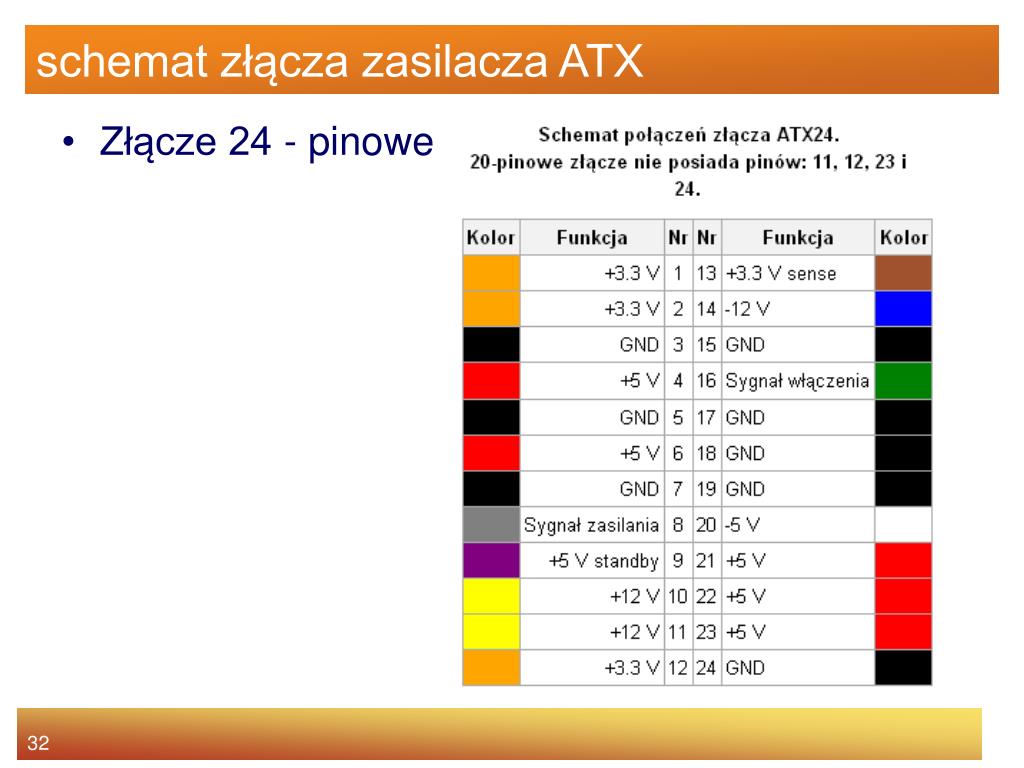
PPT - Zasada działania zasilaczy komputerów IBM/PC PowerPoint ...
Complete Guide To ATX Connector Pinout 28 Supernova

Complete Guide to ATX Connector Pinout 28 Supernova
I Am Using The ATX2 (24 Pin). The Important Pins That Will Be Using For

I am using the ATX2 (24 pin). The important pins that will be using for ...
PPT - Zasada Działania Zasilaczy Komputerów IBM/PC PowerPoint
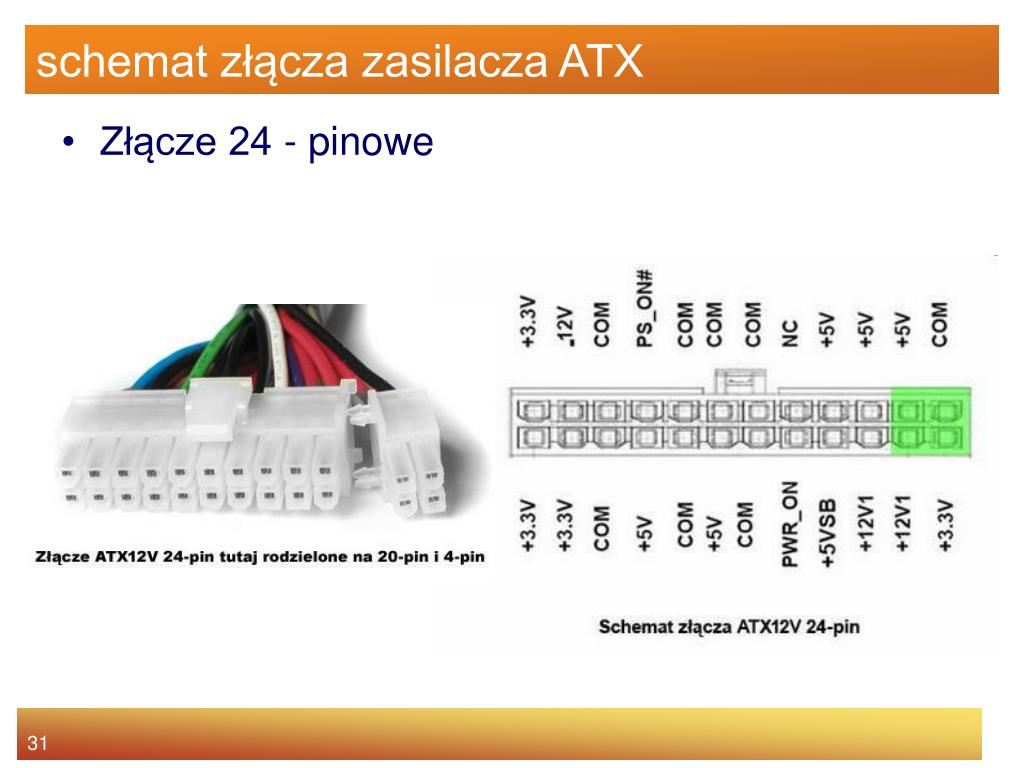
PPT - Zasada działania zasilaczy komputerów IBM/PC PowerPoint ...
Uruchamianie Zasilacza ATX Bez Płyty Głównej | Solucja Wiki | Fandom
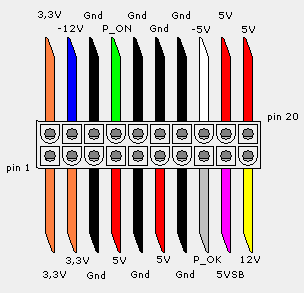
Uruchamianie zasilacza ATX bez płyty głównej | Solucja Wiki | Fandom